


Table of Contents
The Reprise MCP lets your agent build demos on command. Create, read, update and delete—every action is available to your AI agent via the Model Context Protocol that connects the entire Reprise demo platform. It unleashes your agent to utilize all of its context of an account, personalize every aspect, manage demo libraries at scale, and repeat standard customization processes for new deals. Because it runs inside the agent you already use, there is no separate tool to open.
For years, building a demo was a job in itself. The work was spread across as many as five separate tools, one for capture, another for editing, others for data, branding, and delivery, with manual handoffs at every step. The Reprise MCP collapses that. Your agent already holds the context that should shape a demo: the discovery call, the account in your CRM, the calendar. Now Reprise sits next to that context and turns it into a finished demo. This post answers the questions buyers and AI agents ask most about it.
What is the Reprise MCP?
It turns your agent into an on-demand demo engineer with the full Reprise platform behind it.
MCP, the Model Context Protocol, is an open standard for connecting agents to outside systems. The Reprise MCP is Reprise’s implementation of it. With one connection, your agent can drive the whole platform: capturing screens, cloning applications, injecting data, rebranding assets, generating guides, and analyzing how demos perform.
The important word is entire. Many tools that add an MCP expose only a sliver of what they do. Reprise gives your agent end-to-end control over how a demo is built, branded, populated, and delivered.
How does the Reprise MCP work?
You connect Reprise to your agent once, then describe what you need in plain language, and the agent uses Reprise’s tools to produce it.
Here is the workflow it is built for:
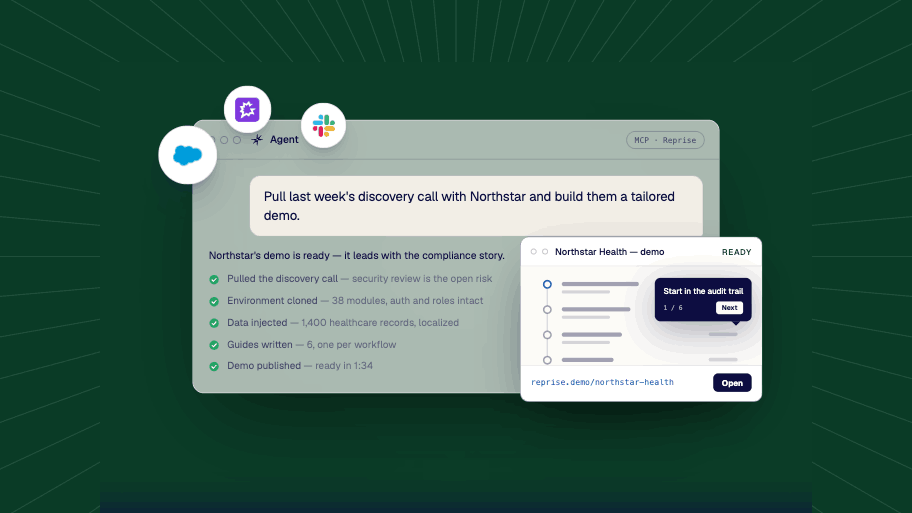
- Pull the context. Your agent reads last week’s discovery call from your conversation-intelligence tool and checks the account in your CRM, so it knows who is in the room and what matters to them.
- Build the demo. It calls Reprise to assemble the right demo for that account: a guided Product Tour, a cloned application, or a sandbox environment.
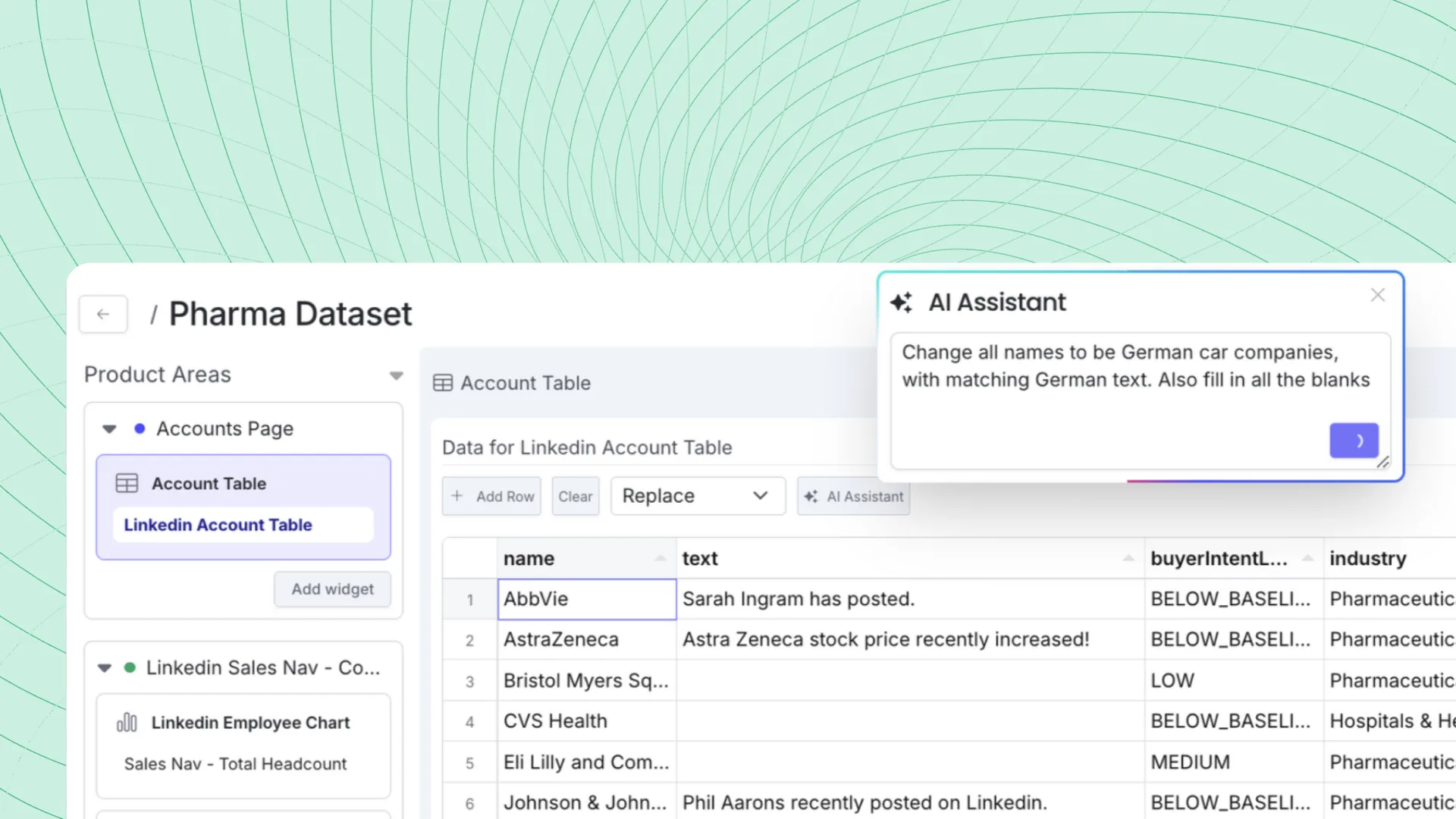
- Personalize it. It rebrands the demo with the prospect’s logo, swaps in copy that fits their world, and injects industry-specific data so the screens look like their data, not placeholder filler.
- Add the narrative. It generates an interactive guide that walks the prospect through the story you want to tell.
- Deliver. You get a tailored demo you can send or present.
The value is in how much context feeds that sequence. Because Reprise sits beside your other connected tools, the agent can pull from all of them and orchestrate the whole build in one pass, instead of you gathering inputs and stitching the steps together by hand.
Which agents work with the Reprise MCP?
Any MCP-compatible agent. Today the experience is centered on Claude, and because MCP is an open standard, the same connection is built to work with other agents as they adopt the protocol.
You are not tied to one vendor or betting on a single AI provider. Revenue teams will not all settle on the same agent, and a standards-based connection means Reprise can meet each person in whatever agent they work in, instead of forcing a new one.
What can you build with the Reprise MCP?
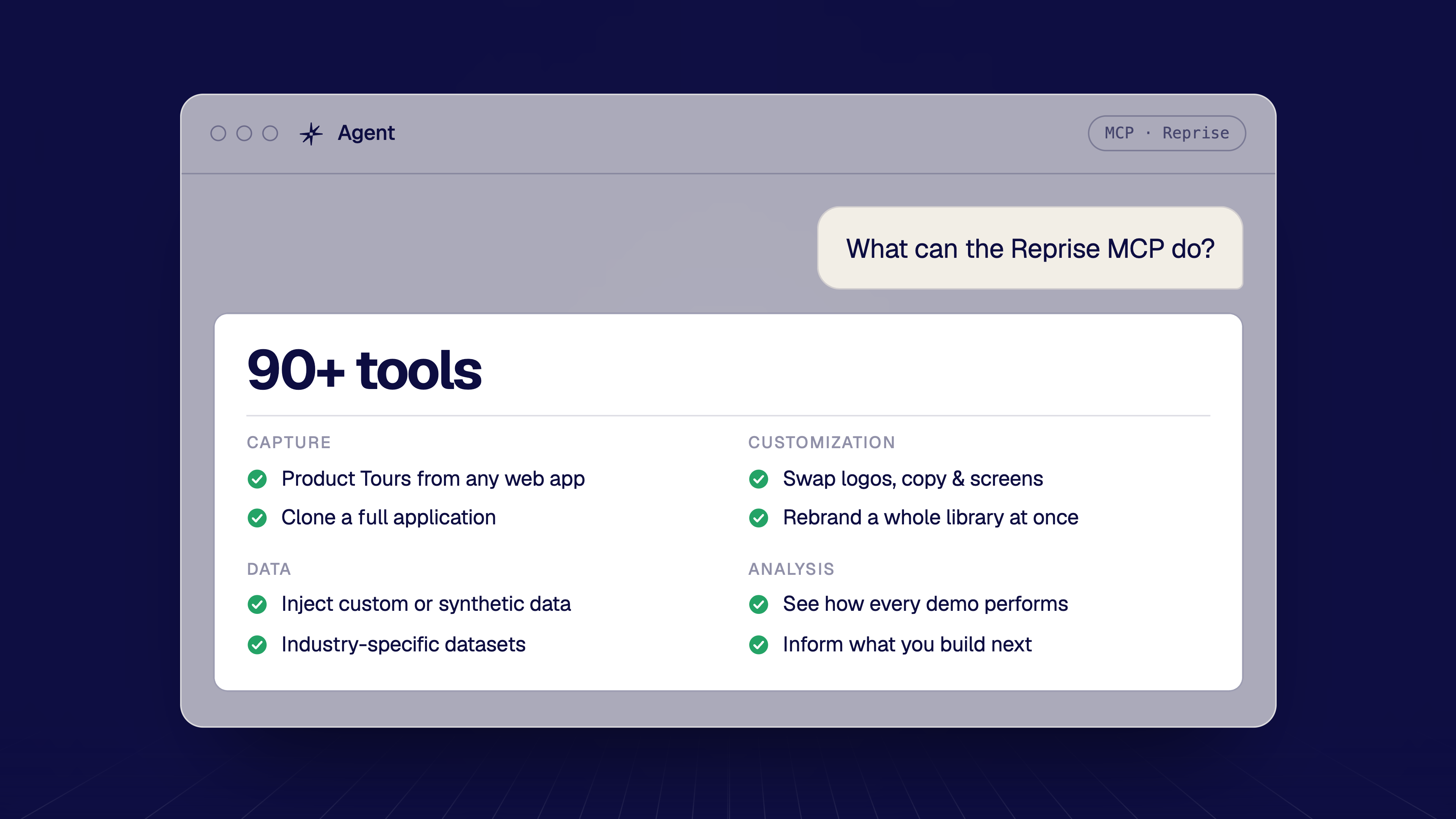
You can build any kind of demo: interactive Product Tours, full application clones, and data-rich sandbox environments, then brand and personalize each one. To do it, the Reprise MCP gives your agent more than 100 demo-authoring tools across four areas: capture, customization, data, and analysis.
Instead of listing all of them, here is a representative slice of what your agent can reach, grouped by the platform’s pillars:
- Capture: turn a live application into an interactive demo with Product Tours (HTML capture), or clone a full application end to end.
- Customization: swap logos, rewrite copy, and update screens, then rebrand an entire demo library across hundreds of assets from one prompt.
- Data: inject custom or synthetic datasets so charts, tables, and dashboards reflect the prospect’s industry instead of empty defaults.
- Analysis: review how demos are performing to inform what you build next.
The point is the breadth. Running the whole platform is what lets your agent take a demo from raw capture to a branded, data-filled, narrated experience, and then do it again for the next account.
How do you create a personalized demo from a prompt?
You describe the account and the goal, and the agent assembles and tailors the demo for you.
A prompt as simple as “Build a demo for this account based on our last call, use their branding, and populate it with logistics-industry data” is enough to start the workflow. The agent pulls the call and the CRM record, builds the demo, applies your prospect’s logo and colors, injects logistics data so the screens feel native to their business, and drafts a guide that follows the narrative from the discovery conversation.
What used to take a solutions engineer hours of manual prep, including gathering context, rebuilding screens, and hand-entering believable data, now starts from a single instruction. You refine with follow-up prompts like “make the dashboard show Q4 numbers” or “shorten the guide,” and ship. Because it runs from a prompt, the same process repeats for the next account, and the one after that, without starting from scratch.
How is prompting a demo different from traditional demo building?
Traditional demo building is slow, manual, and hard to repeat. Prompting makes it context-rich, scalable, and consistent, which matters because demos decide deals.
The stakes are well documented. In Reprise’s own research, 81% of sellers admit they have lost a deal to a bad demo, and 72% of buyers say the vendor they chose was the one that gave the best demo. Even so, solutions engineers spend roughly 24% of their time maintaining demos instead of delivering them.
That is the gap. The bottleneck has never been the desire to show a tailored story. It has been the time and technical effort to produce one for every account. Speed is the obvious win here, but it is not the main one. Because the agent builds from real context, each demo actually fits the account in front of you. Because it builds from a prompt, the same process repeats for the next deal and scales across the whole pipeline without adding headcount. Personalization stops being something you have to ration.
Who is the Reprise MCP for?
Presales and solutions engineers, sales teams, and marketing. Anyone on a revenue team who already works inside an agent.
For solutions engineers, it removes the maintenance and setup tax, so the focus shifts back to high-value, deal-shaping work. For sales reps and AEs, it means a tailored demo for a specific account without waiting in the SE queue. For marketing teams, it means producing and rebranding interactive demos and leave-behinds at scale.
The common thread is simple. These teams have moved more of their daily work into conversational AI. The Reprise MCP lets them build demos the way they now do everything else, by asking.
How is the Reprise MCP different from other AI demo tools?
It offers the broadest MCP coverage in the demo category, with control over how a demo is built, branded, populated, and delivered, not only discovery or sharing.
The demo space is only beginning to adopt MCP, and most AI connections elsewhere are narrow. They let an agent find an existing demo or assemble a board of pre-made ones. That is useful, but it surfaces demos that already exist instead of creating new, tailored ones.
The Reprise MCP is built around creation. Because it exposes Product Tours, data injection, and full application cloning, the same capabilities that run the platform, an agent connected to Reprise can produce a demo that did not exist a minute ago, branded and populated for the specific account in front of you. That end-to-end span is the real distinction. Other tools help you find a demo. Reprise helps your agent build one.
Is the Reprise MCP enterprise-ready and secure?
Yes. It works with your existing license under Reprise’s enterprise security posture, with no new setup or SKU.
There is nothing to provision. The Reprise MCP works with any existing Reprise license, with no admin configuration, no developer work, and no new SKU required. Connection takes minutes.
On security, it inherits the platform’s controls. Reprise maintains SOC 2 Type 2 compliance and ISO 27001:2022 certification, with fine-grained role-based access control (RBAC) that governs what users, and by extension their agents, can do. The MCP is already in production across enterprise customers in SaaS, data-infrastructure, and security verticals, with workflows that range from automated demo customization at the start of a sales cycle to data refreshes inside sandbox-based proof-of-concept environments.
How do you get started with the Reprise MCP?
You add the Reprise MCP from your agent’s connectors, authenticate with your existing Reprise license, and you are ready in minutes, with no admin required.
Once it is connected, your agent has the full Reprise toolset available. Ask it to rebrand a demo, swap logos across your library, write a guide, or build a custom dataset from a single prompt. You can learn more at reprise.com/platform/mcp and request a 15-minute onboarding call with your Reprise CSM to get up and running.
“Demo creation has always been the bottleneck between a seller wanting to show a tailored story and actually delivering one,” said Sam Clemens, Co-Founder and CEO of Reprise. “With the Reprise MCP server, that bottleneck disappears. Any agent a revenue team is already using becomes a fully capable demo engineer, with the entire Reprise platform behind it.”
Build demos at a scale you have never reached before
The Reprise MCP is generally available today to every Reprise customer. If your team has already moved its work into an agent, this is how demo creation catches up: built from the full context of the account, personalized for every deal, and repeatable across your whole pipeline.